> For the complete documentation index, see [llms.txt](https://docs.fomenti.com.br/llms.txt). Markdown versions of documentation pages are available by appending `.md` to page URLs; this page is available as [Markdown](https://docs.fomenti.com.br/movimentos/registradora/lotes.md).
# Lotes
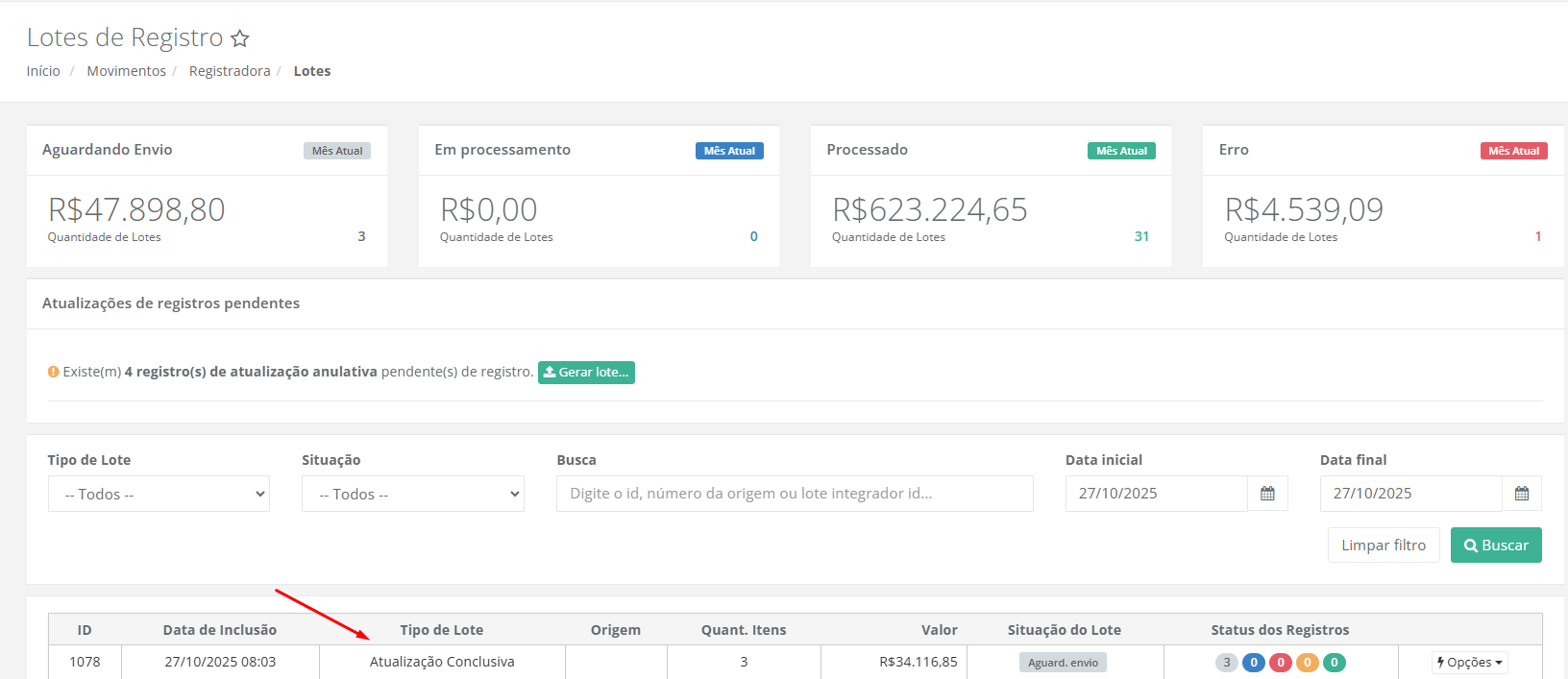
Ao acessar a tela, o sistema apresenta **dados mensais** referentes aos lotes gerados.
**Aguardando Envio:** Lotes que ainda não foram transmitidos à registradora.
\
**Em Processamento:** Lotes que já foram enviados, mas a registradora ainda está analisando ou validando.
\
**Processado:** Lotes que foram concluídos com sucesso pela registradora.
\
**Erro:** Lotes que falharam no envio ou processamento.
## Identificando lotes de homologação
Lotes enviados para o ambiente de homologação da registradora aparecem sinalizados na tela, para evitar que sejam confundidos com um registro real enviado à produção.
Na coluna **Situação do Lote**, além do status atual, o lote de homologação exibe um selo "Homologação" com um ícone de aviso — ao passar o mouse, a mensagem "Este lote foi enviado para o ambiente de homologação e não representa um registro real". A linha do lote também fica destacada com fundo amarelo no grid.
## Atualizações de Registros
A **atualização conclusiva** representa uma **etapa final** no fluxo de registro de títulos.\
Ela é enviada à **registradora** para indicar que determinado registro foi **concluído, liquidado ou encerrado** de forma regular.
A **atualização anulativa** comunica à **registradora** que determinado registro deve ser **anulado**, ou seja, **deixará de ter efeito**.\
Ela é uma forma formal e rastreável de **cancelar** uma informação já registrada.
Ao cancelar ou baixar um título, ele será incluído nos **registros pendentes**, aguardando a **geração dos lotes de atualização**.\
Para visualizar os títulos que compõem o lote, basta clicar em **“Gerar lote”**.
Em seguida, será exibida a tela de **Registros Pendentes**. Basta **selecionar os registros desejados** e clicar em **“Gerar lotes dos registros selecionados”**.
Um **lote será gerado** para o **envio da atualização** à registradora.
## Detalhes de Registros
Para **consultar os detalhes dos títulos enviados**, clique em **Opções** e selecione **“Ver detalhes”**.
Nessa tela, será exibido o **status de registro de cada título**.\
Para **consultar os detalhes de um título individualmente**, basta clicar em **“Ver detalhe”**.
A tela apresentará **todos os detalhes** do registro do título junto à registradora.